
Icinga2 Integration Guide
Icinga is an open-source system monitoring platform. It was first created as a fork of Nagios. It has since developed more of its own core tools and has made it easier to handle plugins and integrations. Over the years, it has evolved into a popular system and network monitoring platform. It helps companies identify vulnerabilities in their system through constant monitoring. Make the most of Icinga by integrating with TaskCall. Use our powerful incident response and management system to address alerts raised by Icinga in real time.
Pointers
- The integration happens between a TaskCall service and Icinga2.
- Incidents will automatically resolve in TaskCall when metrics fall back within the normal threshold.
- Incidents in TaskCall are automatically synced up when problems in Icinga2 are acknowledged.
- At the moment this integration only allows alerts to be received in TaskCall from Icinga2.
In TaskCall
- Go to Configurations > Integrations and click New Integration.
- Select the Icinga2 integration.
- Give the integration a name and configure how incidents will be created. Only the Default Service field is required. The rest are optional.
- Incidents (Optional)
- TaskCall automatically maps incoming payloads with internal attributes to create incidents. However, this can be customized in the Incidents tab. Constant values can be included alongside placeholders to dictate which attributes should map to the Incident Title, Description, Tags, Snapshots and Vendor URL. To insert a placeholder use double curly braces.
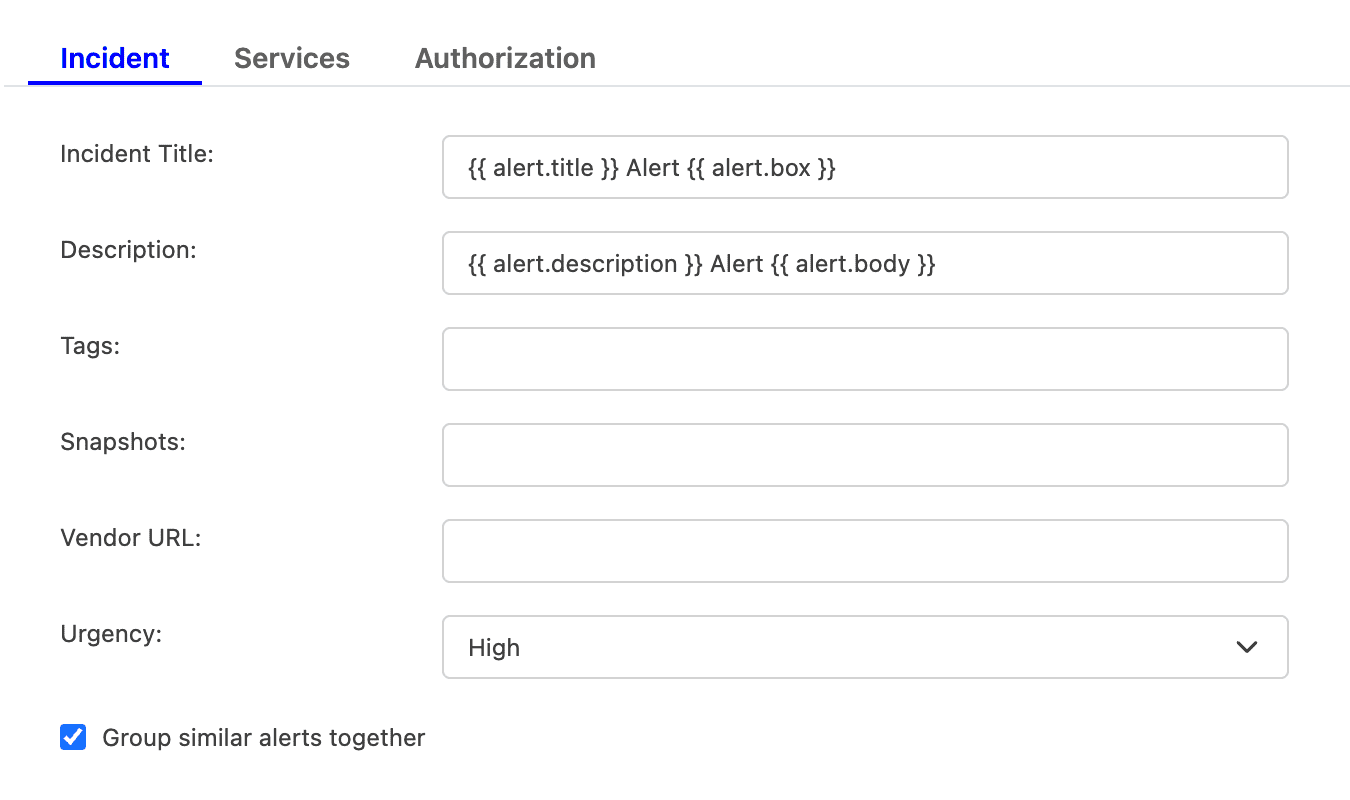
For example, if you enter {{ alert.title }} in the Incident Title field, TaskCall will look for an attribute called "title" nested inside another attribute called "alert" in the incoming payload. If the nested attribute exists, its corresponding value will be pulled from the payload and inserted. If the nested attribute does not resolve successfully, TaskCall will fall back to the default mapping.
If you are unsure, please leave the fields empty. TaskCall will use the default mapping to create the incident for you. - Select the Urgency level the incident should be created at.
- Select the option to Group similar alerts together if you would like follow up triggers from the same alert source to be grouped into the same incident. If you leave this option unchecked, then a new incident will be created for every trigger. (This behavior is specific to new triggers; not updates to an alert.)
- Click Next to move on to the Services tab.
- TaskCall automatically maps incoming payloads with internal attributes to create incidents. However, this can be customized in the Incidents tab. Constant values can be included alongside placeholders to dictate which attributes should map to the Incident Title, Description, Tags, Snapshots and Vendor URL. To insert a placeholder use double curly braces.
- Services (Required)
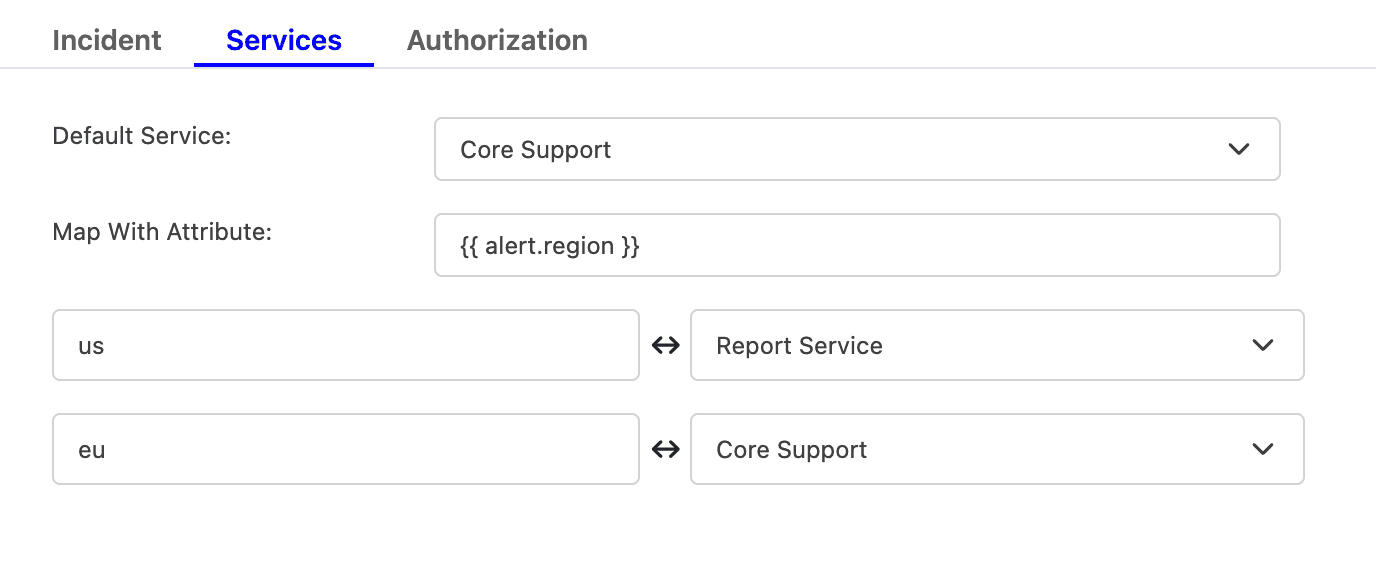
- Select the Default Service incidents should be sent to. To route incidents to different services instead, set Map With Attribute to the attribute to route by using a placeholder. Then, map each value it can take to the service that should receive it.
For example, to route by a region attribute sent in the payload, set Map With Attribute to {{ region }}, then map US to one service and EU to another, and so on.
- Click Next to move on to the Authorization tab.
- Select the Default Service incidents should be sent to. To route incidents to different services instead, set Map With Attribute to the attribute to route by using a placeholder. Then, map each value it can take to the service that should receive it.
- Authorization (Optional)
- The Authorization tab allows a Bearer Token and an IP Allowlist be added if you would like to restrict who is able to send alerts to this integration. If you are unsure, this can be skipped.
- Once done, click Save.
- Copy the Integration Url that is issued for the integration. This will be used to set up the notification in Icinga2.
On Icinga2
- Install TaskCall Icinga2 plugin.
curl -s https://api.github.com/repos/taskcallapp/taskcall-icinga2/releases/latest | grep '"browser_download_url"' | sed -E 's/.*"([^"]+)".*/\1/' | wget -i-unzip -a taskcall-icinga2.zip
- Give execute permission to primary script in TaskCall's plugin.
chmod +x taskcall-icinga2/scripts/send_to_taskcall.py
- Icinga2 can send alerts to endpoints that it defines as contacts. The downloaded plugin contains the TaskCall contact that Icinga2 uses to send alerts to TaskCall. Some changes need to be made to this file.
Open /{installation path}/taskcall-icinga2/taskcall_icinga2.conf and replace the <INTEGRATION_KEY> placeholder in the NotificationCommands with the integration key you copied from TaskCall earlier ({installation path} could be /home or whichever parent directory the plugin is installed in). Please ensure that the path to the script is also updated in case you installed the plugin in a different directory from /home.
object NotificationCommand "taskcall-service-notification" {
import "plugin-notification-command"
vars.hgns = {{ host.groups.join(",") }}
vars.sgns = {{ service.groups.join(",") }}
command = ["/home/taskcall-icinga2/scripts/send_to_taskcall.py"]
arguments = {
"-integKey" = "<INTEGRATION_KEY>"
"-entityType" = "service"
"-ntt" = "$notification.type$"
"-ldt" = "$icinga.long_date_time$"
"-s" = "$service.name$"
...
...
}
}
object NotificationCommand "taskcall-host-notification" {
import "plugin-notification-command"
vars.hgns = {{ host.groups.join(",") }}
command = ["/home/taskcall-icinga2/scripts/send_to_taskcall.py"]
arguments = {
"-integKey" = "<INTEGRATION_KEY>"
"-entityType" = "host"
"-ntt" = "$notification.type$"
"-ldt" = "$icinga.long_date_time$"
"-hn" = "$host.name$"
...
...
}
}
...
...
- Now we need to copy this file to the Icinga available features folder so Icinga can have access to it.
cp /{installation path}/taskcall-icinga2/taskcall_icinga2.conf /etc/icinga2/features-available/taskcall_icinga2.conf
- Enable taskcall_icinga2.
icinga2 feature enable taskcall_icinga2
- Restart Icinga2.
systemctl restart icinga2
- Done! You are all ready to receive alerts in TaskCall from Icinga2.
If you are finding it difficult to get the above integration to work or the integration is not rendering results as expected then please contact us at support@taskcallapp.com .