What Is a Runbook? Definition, Examples, and How to Write One
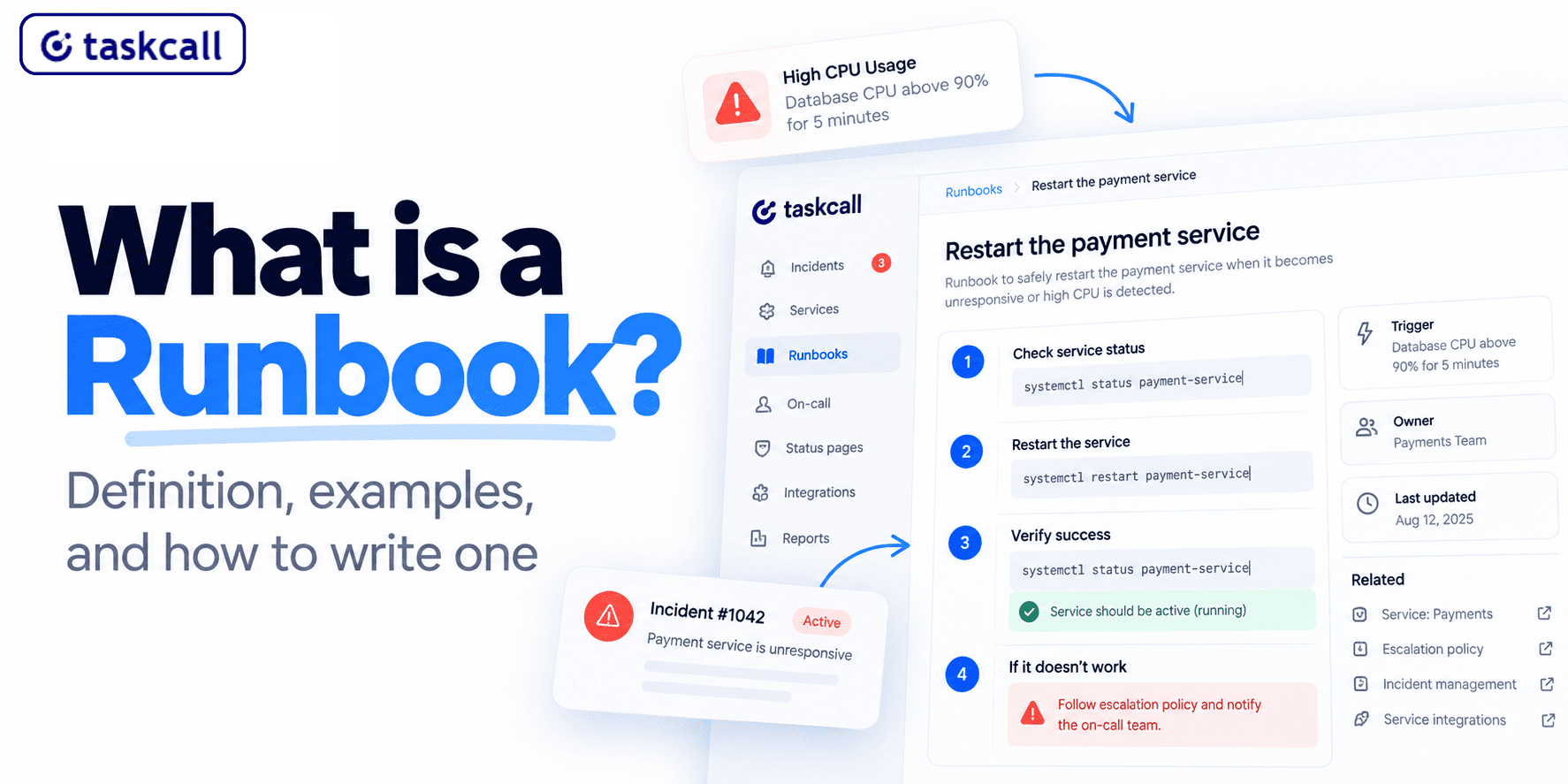
A runbook is a written procedure for handling a specific operational task. Restart the payment service. Roll back a bad deploy. Clear the stuck queue. One document, one job, written so the person following it at 3am doesn't have to think much.
That's the whole runbook definition. The hard part is that most runbooks are written once, by the person who already knows the answer, and never tested by anyone who doesn't.
We build incident management software at TaskCall, so we see a lot of runbooks. The ones that work share a few things, and the ones that rot fail in predictable ways.
Runbook Meaning: What a Run Book Actually Is
It came out of operations teams who kept physical binders next to the server racks. Someone would run the book when a machine misbehaved, which is why you still see it written as run book, two words, in older documentation.
Binders are gone. That idea isn't. Runbooks still answer one question: what do I do, right now, about this specific thing. Not what the system is, not why it broke. Just the steps, in order, with enough detail that following them doesn't require the author standing over your shoulder.
Runbook meaning varies slightly by team. Some use it for anything written down. Others reserve it for step-by-step procedures and use "documentation" for the explanatory stuff. The second is more useful, because it keeps runbooks short. If you want to define runbook in one line: the steps someone follows to fix a known problem.
Runbook vs Playbook
People use these interchangeably, and mostly that's fine. When teams do separate them, the split usually goes:
| Runbook | Playbook | |
|---|---|---|
| Scope | One specific task | A class of incident |
| Steps | Fixed sequence, one right answer | Branching, depends on what you find |
| Judgment needed | Little to none | Often the whole point |
| Typical content | Commands to run | People to involve, decisions to make |
| Length | One screen | However long the scenario takes |
| Example | Restart the payment service | Handle a regional outage |
So you'd have a runbook for restarting a service, and a playbook for handling a regional outage. If your team doesn't need that distinction, don't invent it.
IT Runbook, Operational Runbook, and SRE: Same Doc, Different Context
Same document, different context. What changes is who writes it and how automated it is.
In IT operations, an IT runbook or operations runbook usually covers infrastructure tasks: patching, backups, certificate renewal. These tend to be scheduled rather than reactive, which is why an operational runbook often reads more like a checklist than an emergency procedure.
In DevOps and SRE, runbooks skew toward incident response. An incident response runbook or oncall runbook gets linked from the alert and opened under time pressure, which is why the good ones are short. An application runbook sits somewhere between the two, covering one service rather than the whole platform.
A SOC runbook, for security operations, adds an evidence trail. What is a runbook in cyber security, practically speaking? The same document with chain-of-custody attached. You're fixing the problem and recording what you did for whoever reviews it later. TaskCall's cybersecurity response setup works the same way, with the incident timeline doubling as the record.
One failure shows up across all three: the runbook describes the happy path and stops. Real incidents don't take the happy path.
How to Write a Runbook
Five things separate a runbook someone uses from one that sits in a wiki.
- Name the trigger, not the topic. "Database CPU above 90% for five minutes" beats "Database issues." If the alert comes from a monitoring integration, use the same wording the alert uses. The person opening it should know in one line whether they're in the right document.
- Write the first step as an action. Not background, not context. The first line should be something to do. Background goes at the bottom if it goes anywhere.
- Include the exact command. Not "restart the service" but the actual command, with the actual flags, that actually works in your environment. Runbooks fail on the gap between what the author remembers and what the reader needs.
- Say what success looks like. After each significant step, one line on how you know it worked. This is what stops someone running step four when step three silently failed.
- Write the escape hatch. What to do when the steps don't work. Who to wake up, what not to try, when to mobilise a wider response. In TaskCall this maps to the escalation policy, so the runbook and the paging rules stay in agreement. Most runbooks skip this, and it's the part people actually need.
On length: if your runbook runs past a screen, it's probably two runbooks. Split by trigger.
Runbook Examples: What a Good One Contains
Keep the structure minimal. Trigger, severity, owner, numbered steps, escalation. Anything beyond that tends to go unread.
Steps need the actual commands your team runs, not paraphrased versions. Saying "restart the service" forces the reader to go find the command somewhere else, which defeats the point.
Runbook templates are worth having, but keep them thin. Trigger, severity, owner, steps, escalation. A run book template with fifteen fields gets abandoned by the second runbook.
If you're collecting runbook samples to start from, take them from teams running a similar stack. Generic runbook examples tend to be too abstract to copy directly.
Runbook Automation and Automation Tools
Manual runbooks have an obvious ceiling: they still need a human to read and type. Runbook automation closes that gap by turning documented steps into something the system runs itself. Diagnostic commands don't need a person to execute them, they need a person to read the output.
That's the practical starting point for most teams. Automate the gathering, keep the deciding.
There's a second reason worth knowing. Primary on-call responders often lack production access to run the checks themselves, so they escalate to a DevOps engineer purely to execute commands. Automating those checks removes an escalation that was never about expertise, only permissions.
TaskCall's automated diagnostics work this way, and recent code and production changes get highlighted in the incident details before a responder starts looking.
| Step type | Automate? | Why |
|---|---|---|
| Diagnostic commands that always run the same way | Yes | No judgment involved, only execution |
| Data collection that takes time | Yes | Slow, but the output still needs a human reader |
| Notifications to adjacent teams | Yes | Easy to forget under pressure |
| Changes to production state with no clear rollback | No | The cost of being wrong is too high |
| Steps where the answer depends on context | No | The system can't see what you can |
TaskCall handles the first category through incident workflows, which chain actions together with if/else conditions and run either automatically on an incident event or manually from the incident page. Custom incident actions cover single steps a responder triggers by hand.
One thing worth checking before you plan around this: incident workflows and the Rundeck integration are both limited to the Business and Digital Operations plans.
Running Runbooks From the Incident Itself
Rundeck is a job scheduler and runbook automation system, and the clearest example of what integrated automation looks like in practice.
Connected to TaskCall, it adds a button to the incident page. Someone clicks it and the job runs on the affected service, without pulling in a separate infrastructure engineer just to execute it. Jobs can also fire automatically whenever an incident opens on that service.
Return path matters more than most teams expect. Rundeck sends status back, and TaskCall logs it in the incident timeline and notes. The record of what ran and whether it worked sits with the incident rather than in a separate tool, which also gives context to anyone joining the response later.
It also works in reverse. A Rundeck job that fails outside TaskCall creates an incident on its own, tagged with the execution ID. Failed processes come in at Critical urgency, everything else at High. Set up the On Success notification and the incident resolves itself once the process completes.
Runbook automation tools are worth evaluating separately from your alerting tool, unless the two are integrated. A runbook that runs in a different system from the one paging you adds a context switch at exactly the wrong moment.
Runbook automation software splits roughly into two camps: standalone platforms, and automation built into an incident tool. There's also runbook automation open source, mostly Rundeck, if you'd rather host it yourself.
Linking an Incident Response Runbook to the Alert
A runbook nobody can find during an incident is documentation, not a runbook. Linking it to the alert fixes that: when an incident fires, the responder should see the relevant procedure without searching for it. That means the runbook lives at a stable URL, and the incident trigger or incident workflow references it directly.
It also means the runbook and the escalation policy need to agree. If the runbook says "escalate to the database team" and the escalation policy routes to a generic on-call rota, one of them is wrong.
Where Runbooks Go Stale
Authors leave. Most runbooks are written by one person who knows the system. When they go, nobody knows which steps still apply. Review runbooks when someone hands over, not just annually.
The command changed. Version bumps, renamed services, new namespaces. Commands that error out are worse than no runbook at all, because the responder now debugs the runbook instead of the incident.
It was never tested by a stranger. Authors can't see their own assumptions. Have someone who didn't write it follow it end to end, with no help, and watch where they stop.
Nobody knows it exists. Runbooks scattered across Notion, Confluence, GitHub, and three Slack threads get used by whoever wrote them and nobody else. Automated jobs avoid this by logging execution in the incident timeline, and tagging incidents with the runbook used makes the gap visible for the manual ones.
Cheapest fix for the last one: link the runbook from the alert itself, and check during postmortems whether the responder found it. TaskCall's AI postmortem pulls the incident timeline in automatically, so what ran and what didn't is already there when you review.
Where to Start
Most teams don't need forty runbooks. They need three or four for the incidents that actually page someone, written well enough that a stranger can follow them.
Pick the alert that wakes people up most often. Write the runbook for that one, have somebody who didn't write it walk through it, and fix whatever they get stuck on. Then link it from the alert so nobody has to go looking at 3am.
After that, automation is worth considering. Start with the diagnostic steps, the ones that run the same way every time and just need someone to read the output. Those come off the human's plate first.
TaskCall connects the two halves. Incident workflows run your documented steps automatically when an incident fires, the Rundeck integration executes jobs straight from the incident page, and both log what happened in the timeline where the rest of the response lives.
Free tier available: start here.
Runbook FAQ
What is a runbook in software?
A documented procedure for a specific operational task, usually written so an on-call engineer can follow it without prior context. In software teams it's most often tied to incident response, though scheduled maintenance runbooks are common too.
What's the difference between a runbook and runbook documentation?
Usually none. Some teams use "runbook documentation" for the broader library and "runbook" for a single procedure. The distinction rarely matters in practice.
How long should a runbook be?
Short enough to scan under pressure. If it runs past one screen, consider splitting it by trigger. Length is usually a sign the runbook is covering more than one scenario.
Do we need runbooks if our alerts are good?
Yes, and arguably more. Good alerts tell you what broke. A runbook tells you what to do about it, which is why workflow automation tends to follow good alerting rather than replace it. The second is where time gets lost.
What is runbook automation?
Turning documented manual steps into steps a system executes on its own, usually triggered by an incident. Most teams start by automating diagnostics and data gathering, then expand into remediation once they trust the results.
Are there open source runbook automation options?
Yes. Rundeck is the most established, and it integrates with most alerting platforms, including TaskCall on the Business and Digital Operations plans. Whether self-hosting is worth it depends on how much engineering time you have to maintain it.
Who should write runbooks?
Whoever owns the service, with a review from someone who doesn't. Owners know the steps. Reviewers catch the assumptions.
You may also like...
TaskCall is 50% cheaper than PagerDuty on all pricing plans and offers the same reliability and service commitment. Even the free tier is available for up to 10 users and offers a package of features tailored specifically for small teams.
Looking for OpsGenie alternatives as teams migrate in 2026? Discover the 7 best tools for incident management, alerting, and on-call scheduling. Learn more.