What is a Status Page and Why Every Company Needs One
Imagine your users trying to access the site, but suddenly it stops working. No message, no update, no explanation at all! This type of situation can quickly turn customer frustration into distrust. For businesses, it means support inboxes flooded with text and negative reviews on social media.
This is one of the biggest pain points companies face during a crisis, having fewer opportunities to communicate clearly and instantly with users. When any situation or incident happens, then incident communication can make or break your company's reputation and user trust. A status page is an integral part of an incident management tool, which significantly reduces support tickets during any crisis or incident.
From the perspective of Software and IT operations, the status page is a crucial communication tool that provides real-time status updates on your website's service components, system, and maintains transparent communication with both users and stakeholders. For DevOps, this page acts as a central hub for service updates, alerts, collaboration, and communication.
Let's take a deeper look at what a status page is, the best practices, and how you can create a clear, straightforward status page.
What is a Status page?
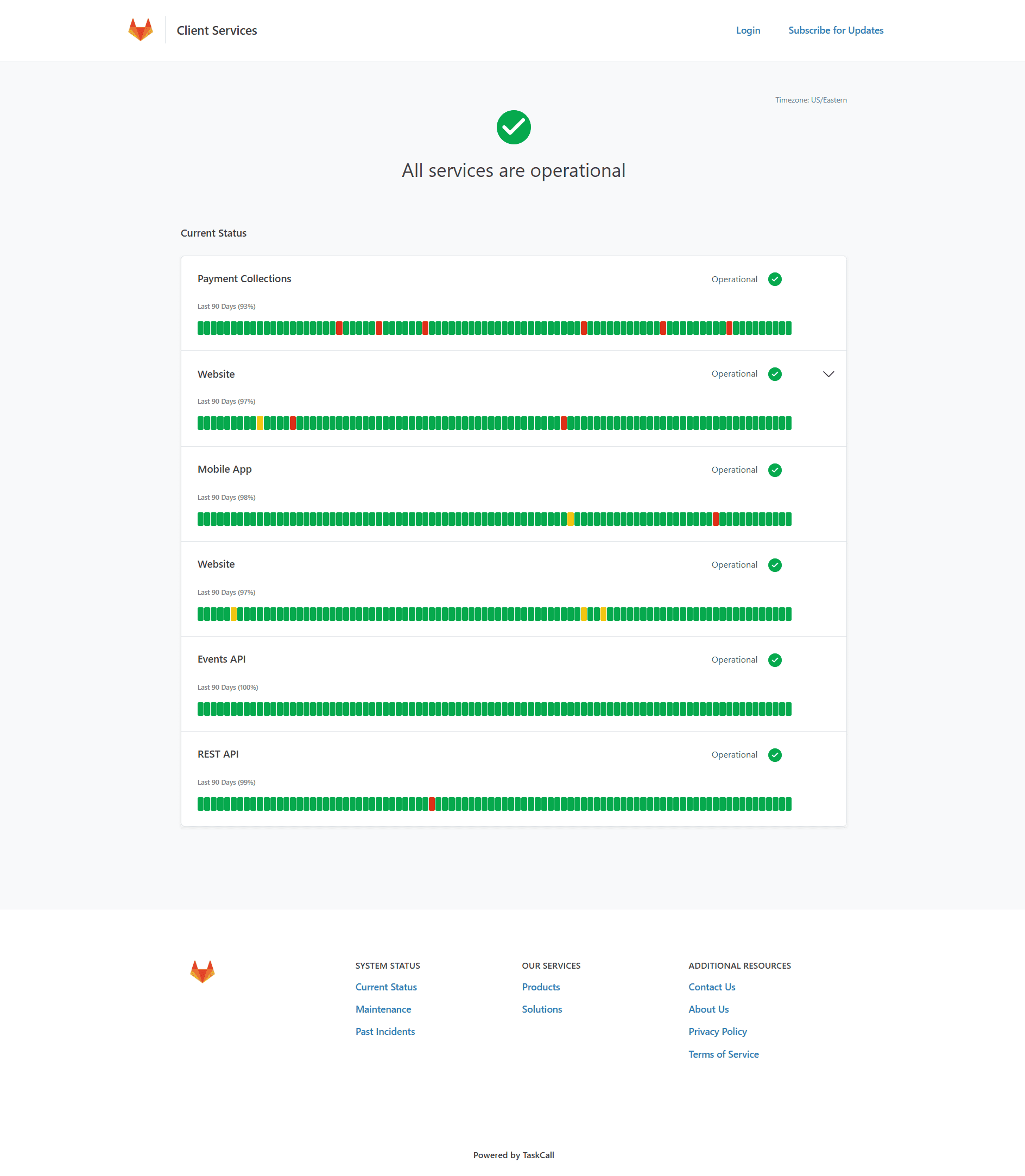
A status page is an incident communication interface or tool that provides the current status of website services, like downtime, uptime metrics, security alerts, and notifies about any service upgrades. A typical status page displays the operational status of ongoing incidents, service components, as well as any ongoing service maintenance.
In simple terms, it serves as a company's communication hub during any crisis, providing real-time status updates. Having a feature-rich status page helps maintain transparency between the company and stakeholders, as well as reducing the workload of support teams during any system disruption.
It functions like a continuous monitoring system, which checks website service endpoints like web servers or databases at regular intervals. Suppose it detects any issues such as downtime, latency, or any abnormality. Then it instantly sends an auto-alert to the incident management system, which then triggers an update on the page.
It can be a standalone website or integrated with any incident management software. Status pages can be categorized into two types:
External or Public Status Page
Public Status Pages help companies communicate effectively with the public or stakeholders about technical issues and current service status. This page is accessible for users, customers, and partners via a link. It is ideal for maintaining transparency while building trust with users.
Internal or Private Status Page
Internal Status Pages are typically password or IP-protected and only accessible to partners and stakeholders. It helps stakeholders stay informed about service health from a single source without interrupting IT and DevOps teams for updates. And minimal disruptions for technical teams naturally accelerate response times during a crisis.
Key Features of Status Pages
A typical status page should include the following components or features:
List of services or systems
The first feature should be the types of key services or systems you want to display on the status page. There should be a system indicator that shows whether the service is operational, partially disrupted, or facing any issues. It helps to understand the current health of the services immediately. Additionally, a well-designed status page shows all the active incidents at the top, including essential details like severity of the problem, nature of the incident and estimated time for resolution.
Historical Context
This is another key component that typically shows the history of past incidents chronologically with timestamps and duration, MTTR, post-mortems of past incidents, and a description of the incident. This helps to understand the impact of the incident and its frequency.
Maintenance Scheduling
This feature lets companies announce their upcoming maintenance events in advance. It also includes expected downtime and timeframes. Scheduled maintenance notifications reduce unnecessary pressure on the support team and prevent confusion about service interruptions among users.
Multi-channel notification
Not all your customers have enough time to check the website regularly. Therefore, users should be given options like email, SMS, Slack, or webhook. Multi-channel alerts ensure subscribers receive notification instantly through their preferred channel.
Custom branding
For a consistent user experience, custom branding is necessary. This feature allows you to customize the status page with your company logo, colors, or some tools even offers a custom domain name. Branding ensures a company's identity and provides validation that the company manages the service, not any third party.
Role-based access/permission
A much-needed administration-level feature to set who can access, edit, manage, publish, and delete incident data of the status page. It eventually prevents unauthorized access to vulnerable data and enhances security.
Real-time uptime monitoring
Uptime monitoring is crucial for any company website. This feature allows for checking website, API, or application endpoints continuously in every few seconds or minutes. This helps the technical team to minimize downtime, respond faster, and most importantly, keep the website's uptime performance transparent on the status page.
Why Does Every Company Need a Status Page?
A robust status page acts as a company's digital health dashboard. It keeps transparency between the two ends, streamlines automation, and importantly, provides a reliable communication interface. So, having a well-designed status page can benefit an organization in numerous ways.
Reduce Support Tickets and User Confusion
According to Atlasian's report, a dedicated status page significantly reduces the number of support tickets during downtime. As these types of pages are designed to provide a real-time update on each website's services, they reduce customer frustration and confusion. The company's support team can focus on resolving the actual incident instead of responding to hundreds of repetitive queries. Hence, it creates a smoother experience for both the organization and customers.
Maintain Transparency Through Clear Communication
A potential buyer always depends on the organization that provides reliability. Status pages enable transparency by showing historical uptime, real-time updates, maintenance updates, and a detailed incident report. These built trust with customers. Additionally, transparent communication helps companies to take accountability whenever any disruption happens. Over time, this transparency becomes a competitive advantage that makes your company stand out.
Provide Accountability with Uptime Records
An ideal status page is not only for showing system health. It holds the records of past incidents, uptime percentages, uptime history, and maintenance logs. Technical historical records demonstrate an organization's ability to resolve issues and its communication during incidents. This approach shows the company's accountability and reliability. In that way, customers and stakeholders can assess the performance of your service.
Improve Internal Coordination and Incident Response
Scattered communication can make the situation worse during an outrage. As a status page is a central place to track incidents, it helps the DevOps team to stay aligned with the possible recovery process. With automated monitoring tools and notifications, team members can maintain ideal coordination while taking faster action.
SLA Commitments to Meet Enterprise-Level Requirements
To handle enterprise clients, companies often need to meet strict Service Level Agreements (SLAs). As it offers a verifiable and transparent record of uptime and performance metrics, it helps companies to demonstrate compliance and justify their service-level promises. Many companies consider having a well-structured status page as a sign of professionalism and operational maturity.
Best Practices to Manage a Status Page
Managing a status page is more than just providing regular updates on services. It requires a timely response, consistent maintenance, and clear communication between the two parties. Below are the most effective best practices companies should follow.
Keep Incident Posts Simple
The post should effectively communicate about the incident - what happened, what services have been impacted, and what is being done. The message should be concise and simple, yet descriptive enough so stakeholders can be sufficiently informed.
Regular and On-time Updates Until the Issue is Resolved
For long-running incidents, providing an update once is not an effective approach. Regardless of any major progress, Users expect continuous communication. So, companies should aim to update every 20–30 minutes for critical outages. Additionally, this demonstrates that your team is actively working on the incident. Also, consistency helps to prevent pressure on the support team and keeps the user informed throughout the recovery process.
Incorporate Multi-Channel Notifications
To keep users informed everywhere, an ideal status page should have integration with automatic email alert tools, SMS updates, Slack notifications, or webhook integrations. Even though users are not checking it regularly, ensure they get updates instantly through multi-channel notifications. In that way, customers feel more secure when they get updates automatically. Also, it reduces the chances of missing information.
Provide ETA (Estimated Time of Resolution) for Clarity
During any incident, users want to know when the service will be restored to normal. Even though the estimated time is not confirmed, share at least realistic expectations. Also, if the timestamps change, notify promptly. Providing an ETA significantly reduces uncertainty and decreases repeat customer inquiries. Eventually, it shows responsibility and reflects confidence in the team's recovery plan.
Provide Detailed Postmortem
Detailed postmortem is necessary for transparency. It should be appended to the content of the original incident post as an overview of the aftermath and the steps that have been taken to avoid a recurrence. Stakeholders always appreciate it when companies take accountability and identify areas of improvement.
A well-drafted postmortem should include:
-
A summary of the Incident
-
Root cause analysis (RCA)
-
Impact on users and system
-
Timeline of the incident
-
What types of action had been taken to resolve the issue?
-
Preventive measures
-
Documentation- runbooks, playbooks
-
Lesson learned
Why Should Companies Use TaskCall?
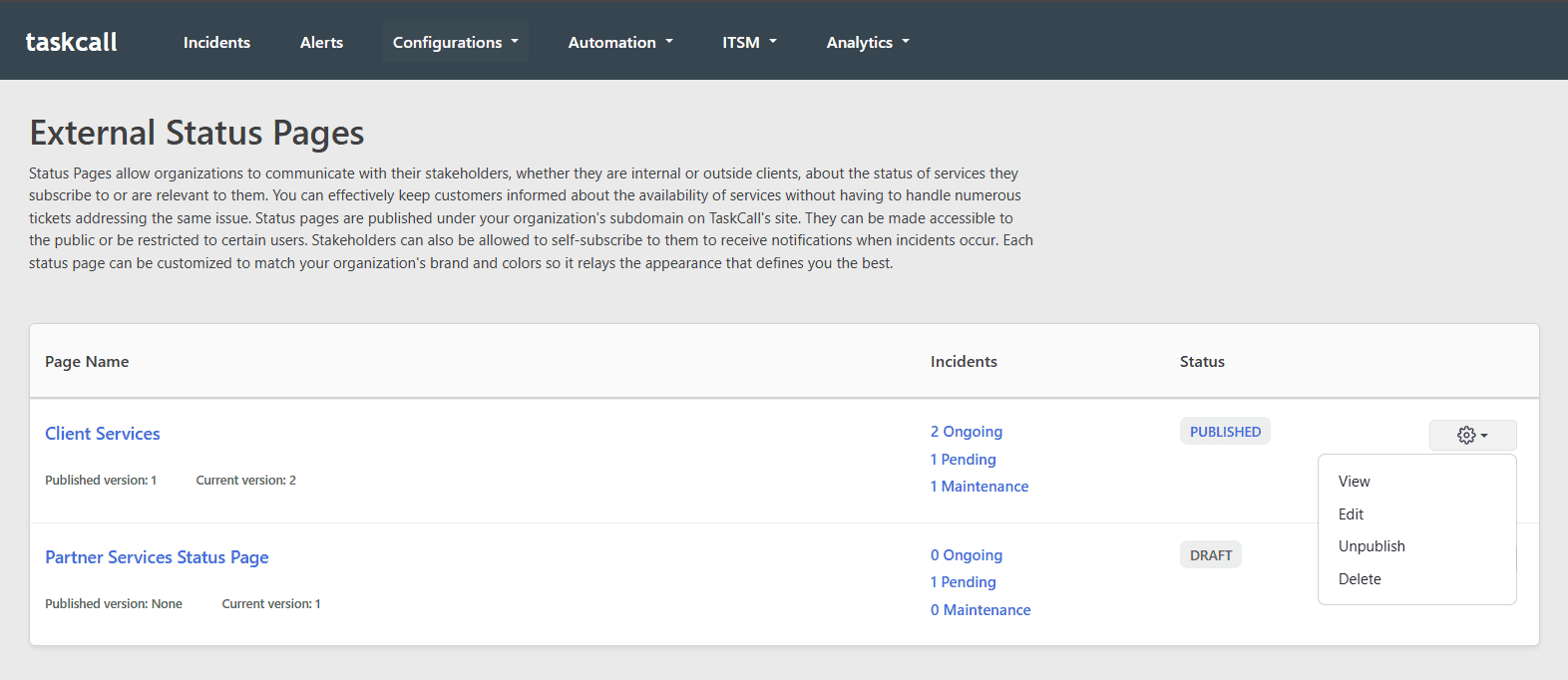
Taskcall is an all-in-one incident management platform that offers effortless creation and management of status pages. Companies can create and manage status pages seamlessly for internal and external stakeholders. Also, companies can manage these two pages right from the same platform they use for incident response.
Customizable Status Page Design
Teams can customize status pages to align with their company theme by adding a cover image, logo, and setting their own layout and brand colors. This gives their status pages the same feel as the rest of their site, despite being hosted on a third-party application.
Review Before Publishing
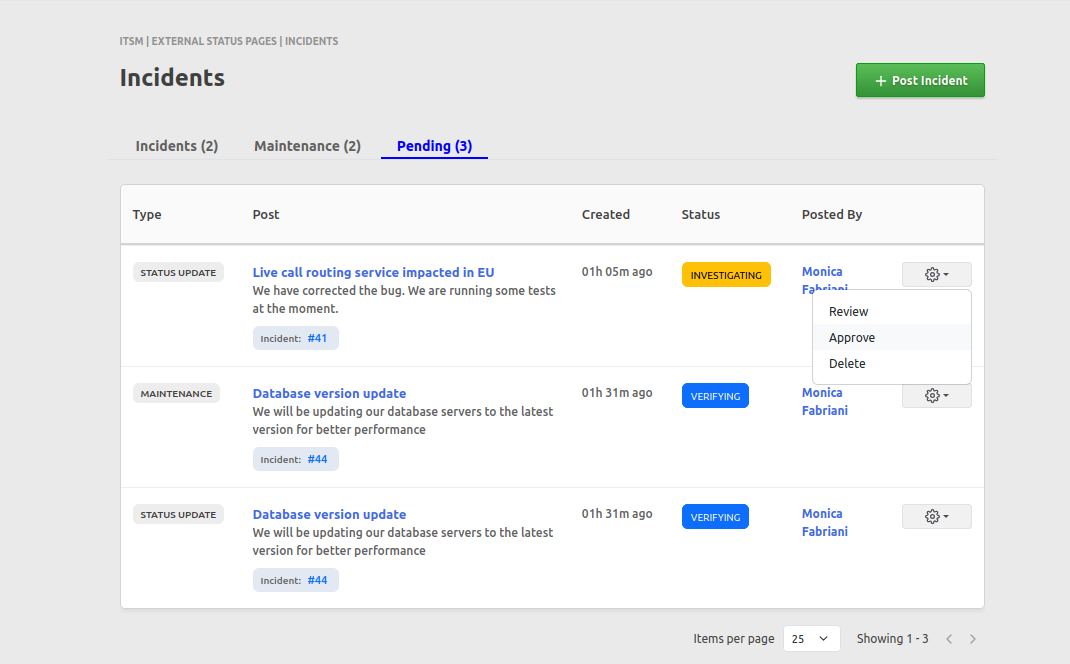
Taskcall allows for the approval of workflows before publishing content on the status page. You can review the content after finishing all the setup. This feature is necessary during any high-pressure situation. Teams can double-check the information before publishing. It reduces human error and maintains consistent communication accuracy.
Automatic Syncing with System Incidents
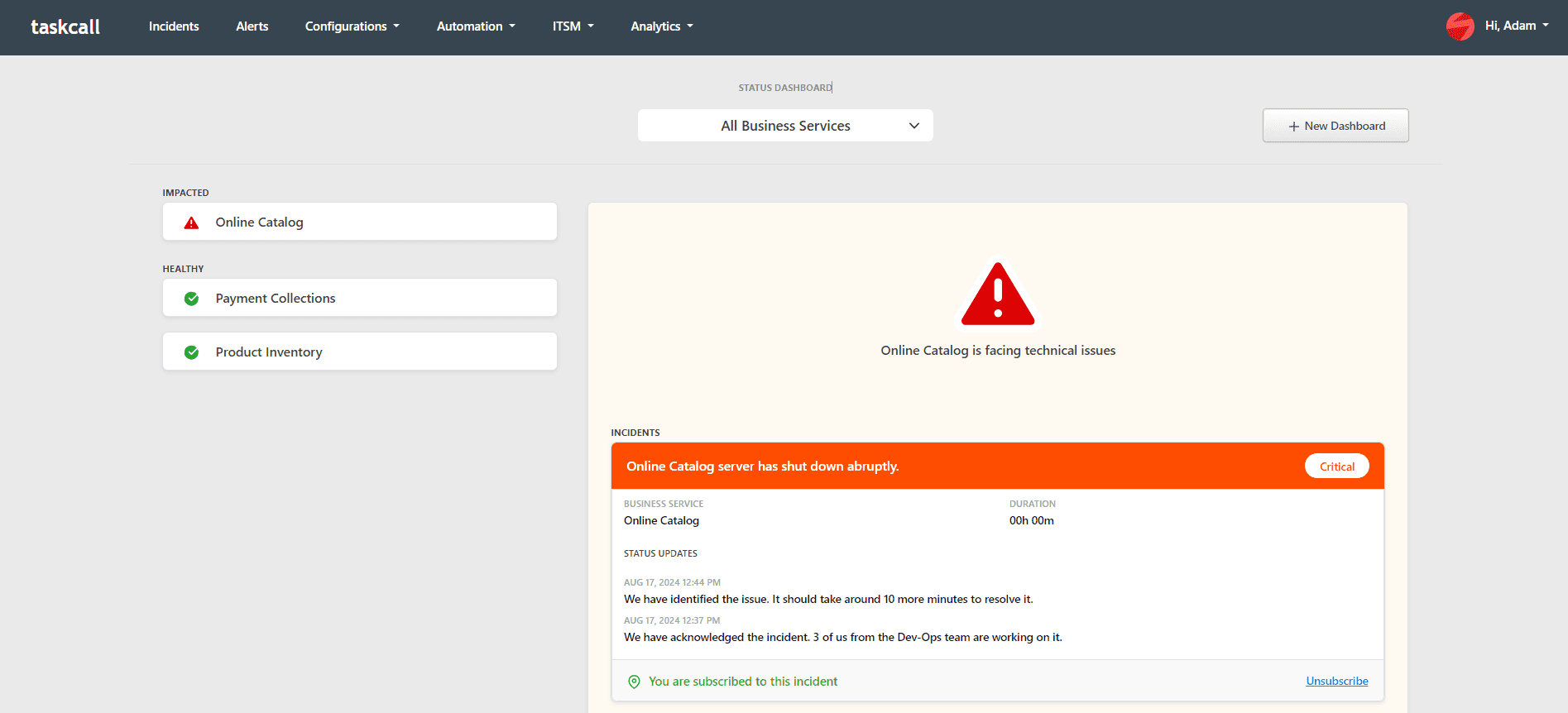
Incidents are automatically posted on status pages when a system incident is logged in TaskCall that impacts one of the services listed on them. Updates, shared by DevOps engineers regarding the ongoing investigation or resolutions, are also automatically reflected as well (with a human in the loop approval process if preferred). This significantly reduces the workload for engineers to manually update multiple platforms.
Subscriber Management
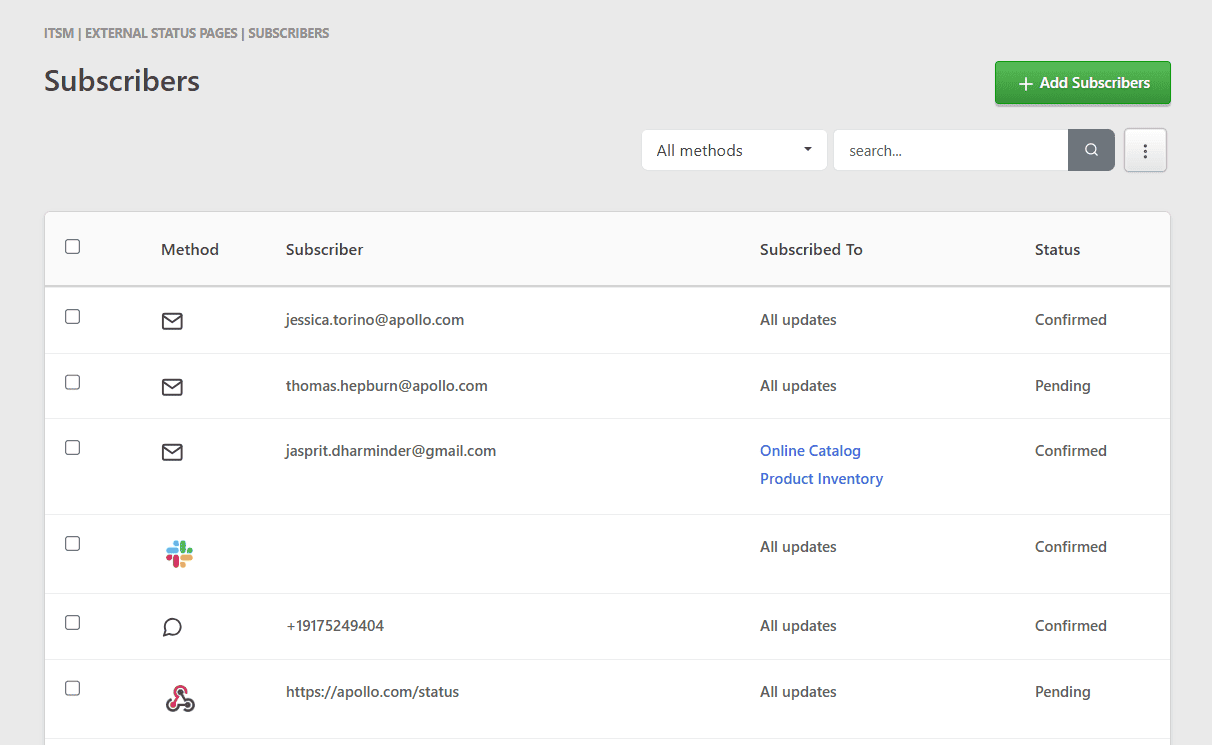
On TaskCall, users can subscribe to the company status page using the self-subscription feature to get notifications whenever there is an incident or maintenance happens. Also, companies can manually add subscribers using CSV files and specify which services they are interested in. In this way, users will get automatic and relevant notifications.
Multiple Status Pages
Taskcall allows companies to create multiple status pages. They can create different dashboards depending on the audience base. This is important for companies that cater different audiences and offer multiple products.
Templates for Quick Communication
TaskCall allows companies to create templates for both incident management and maintenance updates. These templates include pre-defined titles, messages, and interrupted business services. Pre-written templates are ideal for publishing updates during high-pressure situations.
Try TaskCall To Create an Automated Status Page!
Transparency is something that keeps customers coming back to your business. Hence, having a feature-rich automated status page is not merely a nice-to-have; rather, it is essential. With Taskcall, it is easier to create an actionable status page with branding, templates, automated notifications, and real-time updates. Your technical team can now focus on real issues without scrumming during a crisis.
Start 14-day free trial today and create a status page that keeps your customers informed during an outage.
Frequently Asked Questions (FAQs)
1. What does a status page do?
Status page is a communication interface that act as a public or internal dashboard to display the current issues and health of your services.
2. What are the features of a status page?
Key features of a status page are- real-time updates/notifications, custom branding, multi-channel communication, historical context, list of top services, and role-based access permissions.
3. How does a status page reduce support tickets during outages?
When any incident happens, customers rush to support, and it becomes overwhelming for the support team to handle such pressure. A status page provides instant updates of any outages or updates, also shows what service is affected, the severity of the issue, and the estimated resolution time. It immediately provides reassurance to the customer.
4. How does TaskCall help companies to manage status pages effortlessly?
Taskcall helps to sync incidents immediately and provide real-time notifications via multiple communication channels. It also offers some amazing features for companies to manage status page easily- custom branding, manage subscribers, templates, maintenance scheduling and review before publishing.